> ## Documentation Index
> Fetch the complete documentation index at: https://docs.parable.work/llms.txt
> Use this file to discover all available pages before exploring further.
# Reports
> Run a Parable's pipeline Plots now or on a schedule, and read the durable outputs each Report produced.
# Reports
## Sources
Docs: [Plots](/ponder/parables/pieces/plots), [Preferences](/ponder/parables/pieces/preferences), [Powers](/ponder/agent-skills)
Web App: Open a Parable in **Ponder**, then use **Run Report** or **Schedule Report** from the Report actions menu; the Report cascader in the header selects **Current** or a stored Report.
A Report is one execution of a Parable's pipeline Plots. Each run produces
durable outputs that readers can select later, even after the Parable's code
changes. A Parable's definition version identifies code and schema; a Report
identifies produced data.
## Run a Report now
1. Open the Parable and choose **Run Report**.
2. Parable captures the exact definition, the visible Preference membership and
values, and your identity as the requester.
3. The run is queued and produces real outputs before it is shown as complete.
Pending, failed, empty, stale, unavailable, and incompatible results are
shown as such; Parable does not switch readings to hide a failure.
## Schedule Reports
Choose **Schedule Report**, then enter a schedule in your own words. For
example, **Every weekday at 9am, starting next Monday**. Review the interpreted
schedule and upcoming runs, then choose **Save schedule**.
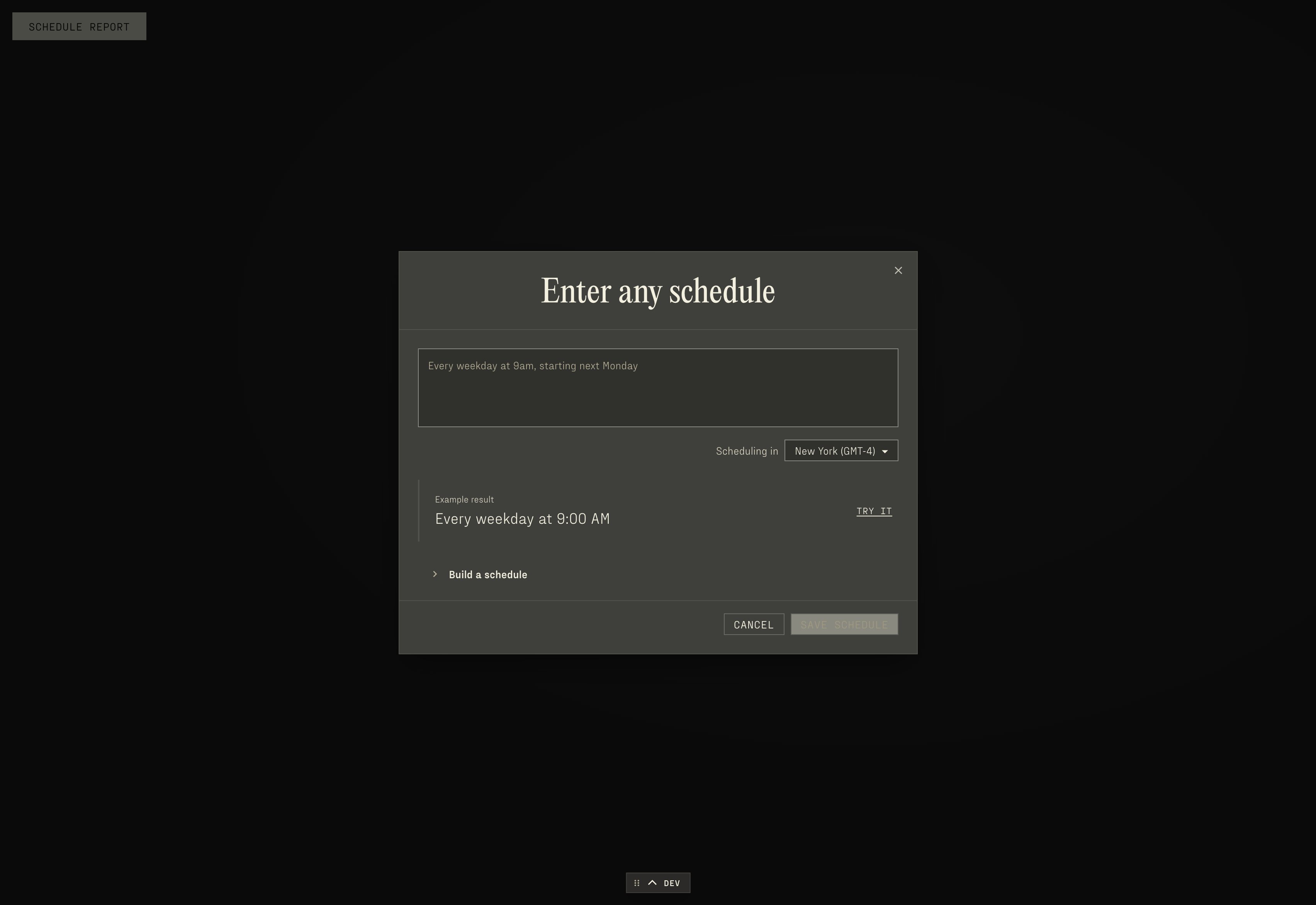 New schedules use your browser's timezone, shown beneath the input. Change it
there if the Report should follow another timezone. Existing Plans keep their
saved timezone and start. Upcoming runs are displayed in the selected timezone.
**Build a schedule** opens the repeat, day, time, start, and end controls. Text
entry and the controls edit the same Plan. Opening the controls does not change
a saved schedule. Changing the time preserves its calendar dates, weekday
exclusions, and seconds. If the controls cannot preserve a schedule's details,
saving those edits is disabled; enter a new schedule above to replace it.
An example result appears before you enter anything. It is not saved until you
try it and choose **Save schedule**. If a phrase cannot become a supported Plan,
the input stays in place and shows **We can't Ponder that... Try something else!**
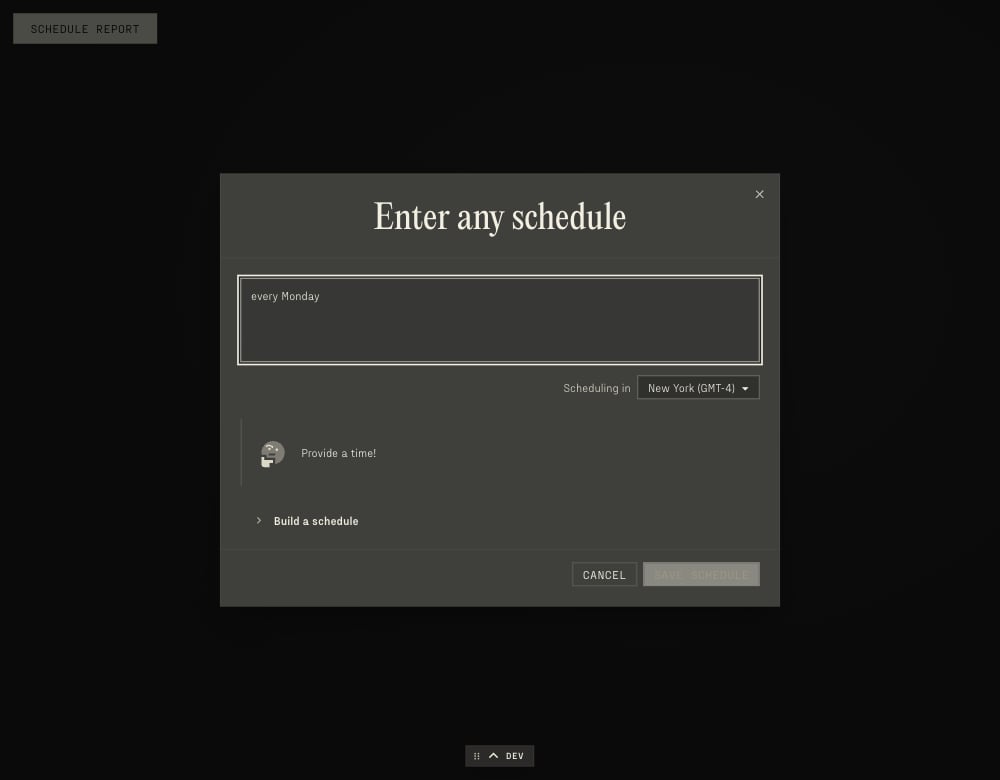
with a thinking icon. Edit the phrase or use the schedule builder. If only the
time is missing, the message is **Provide a time!**. Add a time to the same
phrase to continue. A malformed time still shows the general error.
New schedules use your browser's timezone, shown beneath the input. Change it
there if the Report should follow another timezone. Existing Plans keep their
saved timezone and start. Upcoming runs are displayed in the selected timezone.
**Build a schedule** opens the repeat, day, time, start, and end controls. Text
entry and the controls edit the same Plan. Opening the controls does not change
a saved schedule. Changing the time preserves its calendar dates, weekday
exclusions, and seconds. If the controls cannot preserve a schedule's details,
saving those edits is disabled; enter a new schedule above to replace it.
An example result appears before you enter anything. It is not saved until you
try it and choose **Save schedule**. If a phrase cannot become a supported Plan,
the input stays in place and shows **We can't Ponder that... Try something else!**
with a thinking icon. Edit the phrase or use the schedule builder. If only the
time is missing, the message is **Provide a time!**. Add a time to the same
phrase to continue. A malformed time still shows the general error.
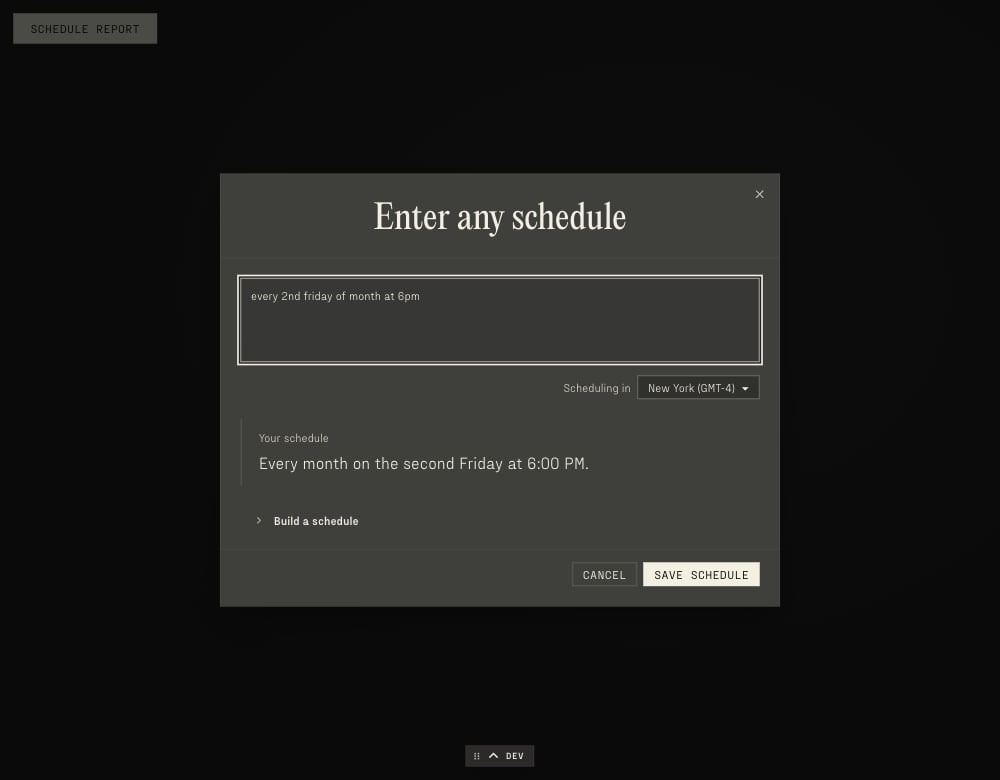
 Monthly ordinals work in words or digits: **every 2nd Friday of month at 6pm**
means the second Friday of each month at 6:00 PM. For phrases such as **every
month at 9am**, review the day shown in the interpretation and upcoming runs.
That day is retained when you change the time in the builder.
Monthly ordinals work in words or digits: **every 2nd Friday of month at 6pm**
means the second Friday of each month at 6:00 PM. For phrases such as **every
month at 9am**, review the day shown in the interpretation and upcoming runs.
That day is retained when you change the time in the builder.
 Plans support timed, daily-or-longer recurrences and a single timed occurrence.
Time windows, multiple separate schedules, and sub-daily recurrences cannot be
saved through this input. A recurring schedule combined with a separate one-time
run, such as **every Monday at 9am; tomorrow at noon**, is rejected as a whole.
Remove the additional schedule and try again. Seconds are supported and shown
in the upcoming-run preview.
Upcoming runs come from the server's recurrence preview, which uses the same
expansion engine as execution. See the
[recurrence preview reference](/protocols/reference/web-api/parable-authoring-preview-workspace-parable-recurrence)
for its input and output contract.
The selected timezone and start keep relative dates and daylight-saving changes
anchored to the intended local time. A one-time request runs once. Plans that
repeat every few weeks or stop after a number of runs preserve their original
start when reopened.
Editing a schedule does not publish the Parable, and publishing does not run a
Report or reset its schedule. Scheduled runs execute under the Workspace's
explicit service principal and its permissions, not the credentials of whoever
created the schedule. If the scheduler is behind, missed occurrences coalesce
into one run and the next occurrence is always in the future.
## Read a Report
The Report cascader selects **Current** or a specific Report:
* **Current** is the newest completed Report whose output fits the selected
definition; it can come from an earlier compatible definition.
* An explicit Report stays pinned. An unavailable or incompatible result does
not fall back to Current.
Ordinary SQL Plots and previews may query completed pipeline outputs with their
own parameters. Direct reads of a materialization keep their captured inputs
and refuse different overrides. Reading a Report checks its captured inputs
against current Policies, so a deleted or newly hidden input can make an old
result unavailable rather than substituting today's values. See
[Plots](/ponder/parables/pieces/plots#storage) for `plotApi.readReport`.
## Current limits
* A Report cannot yet consume another pipeline Plot's newly produced output in
the same run; it can consume a compatible output completed in an earlier
run.
* Provider historical-input replay is limited: principal-dependent filters need
the captured principal, and full Parable-context Provider filters can refuse
materialization.
The built-in **Reports** [Power](/ponder/agent-skills) carries these rules for
Ponder when it designs a Report pipeline.
## Reference
* [Check which Reports a Parable can run](/protocols/reference/web-api/parable-authoring-workspace-parable-report-context)
* [Run a Report on a Parable](/protocols/reference/web-api/parable-authoring-plot-workspace-parable-report)
Plans support timed, daily-or-longer recurrences and a single timed occurrence.
Time windows, multiple separate schedules, and sub-daily recurrences cannot be
saved through this input. A recurring schedule combined with a separate one-time
run, such as **every Monday at 9am; tomorrow at noon**, is rejected as a whole.
Remove the additional schedule and try again. Seconds are supported and shown
in the upcoming-run preview.
Upcoming runs come from the server's recurrence preview, which uses the same
expansion engine as execution. See the
[recurrence preview reference](/protocols/reference/web-api/parable-authoring-preview-workspace-parable-recurrence)
for its input and output contract.
The selected timezone and start keep relative dates and daylight-saving changes
anchored to the intended local time. A one-time request runs once. Plans that
repeat every few weeks or stop after a number of runs preserve their original
start when reopened.
Editing a schedule does not publish the Parable, and publishing does not run a
Report or reset its schedule. Scheduled runs execute under the Workspace's
explicit service principal and its permissions, not the credentials of whoever
created the schedule. If the scheduler is behind, missed occurrences coalesce
into one run and the next occurrence is always in the future.
## Read a Report
The Report cascader selects **Current** or a specific Report:
* **Current** is the newest completed Report whose output fits the selected
definition; it can come from an earlier compatible definition.
* An explicit Report stays pinned. An unavailable or incompatible result does
not fall back to Current.
Ordinary SQL Plots and previews may query completed pipeline outputs with their
own parameters. Direct reads of a materialization keep their captured inputs
and refuse different overrides. Reading a Report checks its captured inputs
against current Policies, so a deleted or newly hidden input can make an old
result unavailable rather than substituting today's values. See
[Plots](/ponder/parables/pieces/plots#storage) for `plotApi.readReport`.
## Current limits
* A Report cannot yet consume another pipeline Plot's newly produced output in
the same run; it can consume a compatible output completed in an earlier
run.
* Provider historical-input replay is limited: principal-dependent filters need
the captured principal, and full Parable-context Provider filters can refuse
materialization.
The built-in **Reports** [Power](/ponder/agent-skills) carries these rules for
Ponder when it designs a Report pipeline.
## Reference
* [Check which Reports a Parable can run](/protocols/reference/web-api/parable-authoring-workspace-parable-report-context)
* [Run a Report on a Parable](/protocols/reference/web-api/parable-authoring-plot-workspace-parable-report)