

Sources
Docs: Workspace API MCP reference Web App: Workspace managers see each Ponder tool’s permission in the Power editor’s Tools tab and set the Workspace default from an approval request (Powers). The hosted MCP endpoint applies the same setting (Workspace tool policy), and each MCP host uses its own confirmation experience. Parable MCP connects assistants and developer tools to the same Workspace operations as HTTP and the SDKs. It has two servers:
The Customer MCP serves the tools listed under
Streamable HTTP: reads of a Workspace’s data, Parables,
Changes, Problems and people, and one tool that saves a query. It serves no
Admin tool. The
Staff MCP serves most Workspace operations and the Admin API’s tools, in each
Workspace that the signed-in person can reach. Ponder offers the same
Workspace tools inside Parable. Operations that only the web app or Parable
itself calls are not tools.
Neither server takes the credential of the other. The Customer MCP refuses a
session token and a staff token. The Staff MCP refuses an MCP token and an
OAuth access token.
A catalog entry never grants access. Search omits operations the current person
cannot use, and Parable checks authentication, permission,
resource ownership, state, and revision again when the tool runs.
When an operation fails, its tool result is an error whose text starts with the
API’s own message, followed by its error code and HTTP status when it sent
them, such as
query references relation "orders", which is not present in the catalog (code: QL-PL-002, status: 400). The internal operation name is not in
it; the host already knows which tool it called.
Discover tools without loading the whole catalog
The local stdio server keeps environment, Workspace, authentication, and catalog tools available. After authentication:- Search with
tool_search. Results contain lightweight titles, descriptions, icons, and handles, not every JSON Schema. - Read the input schema of a selected tool with
tool_schema. - Call the tool with
tool_call. It takes the tool’shandleand anargumentsobject that matches the schema.
tool_call runs the same checks as a direct call of the tool, in the same
order, and refuses with the same text. First it checks that the person may use
the tool with the current sign-in and Workspace. Then it checks the arguments
against the complete input schema. Only then does the call go to the
Workspace API, which checks access again.
tool_enable adds one tool to the session’s tool list and sends
notifications/tools/list_changed. A host that reads the list again, such as
Claude Code, can then call the tool by its own name. The result of
tool_enable says to use tool_call when the tool does not show in the list.
Cursor does not read the list again after the notification. It keeps the list
that it read at connect
(Cursor forum).
In Cursor, use tool_call.
A sign-in, a logout, and a change of Workspace or environment do not change
the tool list. A tool that the session enabled stays in the list. Each call of
it checks the current sign-in and Workspace. When the person cannot use the
tool there, the call is refused, and the refusal names tool_search.
Each tool answers only to its current name. A name a tool had before it was
renamed to match its title no longer works: tool_search, tool_enable,
tool_schema and tool_call do not find it. Search by the tool’s title to
find its current name. The two Piece edit tools, edit_parable_pieces_personal and
edit_parable_pieces_publishing, are now one tool, edit_pieces: it saves
into the open Changes named by proposalId, or onto the Parable when
proposalId is null.
Session activation is isolated: enabling a tool in one MCP connection does not
publish it in another. The stdio server signs in with a session, and the
Workspace’s tool policy does not hold a session. The hosted endpoint applies
that policy to agent credentials
(Workspace tool policy). The MCP host owns its
confirmation experience, except for the approval that tool_call asks for
itself (below).
A generated tool cannot take the name of a session tool, such as tool_call
or gcloud_read. On stdio, tool_enable would publish it in place of the
session tool. The server refuses to start, and the error names the operation
and the session tool.
The streamable HTTP server has no tool_search, tool_enable, tool_schema
or tool_call. It lists its tools with a normal tools/list.
Tools that need approval
Some tools tell the host to ask the person before each call. Their_meta
carries anthropic/requiresUserInteraction, which psgen sets on each
operation whose default Persona policy is ask. A tool that tool_enable
published carries this hint, so a host that reads it can ask. Through
tool_call the host sees only tool_call, so the server asks the person
itself:
- The permission and argument checks run first. A call that they refuse asks nothing.
- The server sends
elicitation/createto the client. The message names the tool, the Workspace, the environment, and each argument. It shows(hidden)in place of a value that may be a credential: a field whose name contains a word such astoken,secretorpassword, and a value that has the shape of a bearer (pat_,Bearer, or a JWT). - The call runs only when the person accepts. When the person declines,
closes the request, or gives no answer in 5 minutes, the refusal starts
with
No call was madeand says which. An answer that comes later runs nothing.
initialize
cannot show the question. tool_call then refuses such a tool. In a client
that reads notifications/tools/list_changed, enable the tool with
tool_enable and call it by its name, so that the host can ask. Or do the
task in the Parable app.
Short schemas and the full schema on request
An enabled tool is published with a short description and a short input schema. The description says what the tool does, when to use it and when not to. What a call returns and the errors the tool is known to answer, each with its fix, come back fromtool_schema as success and knownErrors.
A shape the schema uses
more than once is written once under $defs. When a tool’s definition (its
name, description and schema) would run past about 2,000 tokens, its largest
nested shapes are abbreviated: each becomes a stub under $defs whose
description names it. The Piece edit tools, for example, list every kind of
Piece but abbreviate the Page, Pane and Plot shapes.
- Call
tool_schemawith the handle to get the complete schema, or pass the stub names inexpandto spell out only those shapes and everything inside them. The answer also lists the names still abbreviated. - Every call is still checked against the complete schema before it is sent.
A call that does not match is refused without being made, and the refusal
names each rejected field with the rule it broke, for example
pkg.panes.0.name (required).
tool_schema. It checks every call against the complete schema before it
sends it, as the stdio server does, and refuses a call that does not match
without making it. The refusal is the stdio server’s, without the sentence
that names tool_schema. Arguments that are not an object, such as a string
or an array, are refused as the arguments object (type). The server does
not start when the input schema of a tool in its profile does not compile
into this check.
Ponder searches the same Workspace catalog and loads only the tools it uses.
The operations of the Powers selected for a Message arrive already loaded, so
Ponder runs them without searching first. The Workspace default, or else the
operation’s own default, sets each operation to Never, Ask, or
Always, but that policy cannot grant an operation the initiating person
lacks.
Approvals in Ponder
- Never omits the operation from Ponder’s search.
- Ask pauses the tool call in the Message and offers Deny once and Allow once. When you cannot answer, both buttons are off, and their hint says why. For example, Ponder is off while you view as a colleague, and the buttons wait while Ponder sends your answer.
- Always continues without a separate Ponder prompt.
_meta["anthropic/requiresUserInteraction"]: true, and
destructiveHint: true on every tool that may change or delete data. A tool
that only adds says destructiveHint: false. A host can ask the
person before such a call, but a host can also skip the question, so the
confirmation is a hint and never a control. Parable enforces the rest on
every call: the credential’s scopes, the person’s permissions and seats, the
Workspace’s tool policy, and each operation’s own checks. Save a query for
the Workspace
(save_query_for_workspace) is ask-first: it publishes a Parable that the whole
Workspace can open. It only adds that Parable, so it says
destructiveHint: false
(Save a query for the Workspace).
A tool handle is separate from the operation’s HTTP path, operation ID, and SDK
method name.
Workspace tool policy
A Workspace’s tool policy holds for each agent credential: an OAuth sign-in or an MCP token, through the hosted endpoint or sent to the Workspace API directly. The policy does not hold a session, and Ponder keeps its own approvals. For each tool, the Workspace’s setting does this:
A tool with no Workspace setting takes its operation’s own default. Always
on a write in that table is the Workspace’s choice: the same floor as in Ponder
keeps that write at Ask. An operation’s own default of Always carries no
hint.
The Workspace API decides each call with the rule that decides a Ponder call.
The MCP server copies no rule. It reads the answer for the credential and keeps
it for at most 5 seconds, so a tool can stay listed for that long after a
change. A call for a refused tool still reaches the Workspace API, which
answers
403 with the code WA-PAT-009 and a sentence that names the tool and
the setting. Over MCP that sentence is the text of the tool error. A public Provider catalog tool has no credential on its route, so the
server answers that call itself, with the same refusal.
There is no Parable approval over MCP: Ask and Always both run. The
person already holds that access in the app, and the host owns the question. An
unreadable policy refuses: the Workspace API answers 500 and does not run the
tool, and the hosted endpoint answers 502.
Three tools stay open to every agent credential, and a Workspace cannot set
them to Never: List Powers (list_powers), Read a Power
(read_power), and Read who you are signed in as (read_who_signed_in).
The MCP server reads the third on each cache miss, so a Never on it would
lock out every credential. These three do not read the policy, so a stored
Never on one of them, or a removal of it from its Power, does not hold an
agent credential.
A Workspace can set read_query_guidance to Never. The endpoint then does
not list that tool, and a call to it gets the refusal. The prompts and resources
stay, as a Power stays in Ponder when a tool is at Never. Guidance is not a
tool: they read readBuiltInGuidance, which has no handle, so the tool policy
does not hold it. Its text is on the public docs and holds no Workspace data.
Work with Ponder from an MCP session
An assistant can send a Message on a Problem and follow Ponder’s reply the way a person does in Ponder. Every open page sees the reply live, because the Message travels the same path as a browser send.send_ponder_message and await_ponder_reply are session tools, available
after authentication and tenant_set. Both take the problemId of a Problem
that already exists. On the local stdio server, list_problems finds one and
create_problem starts one. Both are generated tools: call them with
tool_call, or add them to the tool list with tool_enable. The
streamable HTTP server does not offer these tools. send_ponder_message takes the model
choice in model, an object {entry, model, effort, speed}:
entryis the model-list entry’s id,server:harness:account, such asvertex:pi:parableoropenrouter:pi:parable;modelis the models.dev key, such asanthropic/claude-sonnet-5-5, orparable/ponderfor Ponder;effortis one of that model’s effort levels:simple,standardorstrongfor Ponder, and the model’s own levels, such ashigh, for any other model. Null means Default, which isstandardfor Ponder; andspeedis a speed mode the model offers, such asfast. Null means normal speed.
model out to use Ponder Standard. A model the Workspace’s AI policy
refuses fails the send with the policy’s reason. A reply keeps running on the
server if the MCP call ends early.
A reply that calls a tool whose policy is Ask pauses until a person approves it
in Ponder; an MCP session cannot approve it, and the result’s
waitingForApproval names the tools.
Ponder’s own tool catalog does not include the two session tools, and
stop_ponder_reply and steer_ponder_reply default to Never, so Ponder
never stops or steers its own reply.
Streamable HTTP
Parable hosts this server for you.
Connect an MCP host on the
developer site gives its address and the steps to connect Claude Code,
Claude, Cursor, or VS Code.
- One Workspace per URL. The endpoint is
<public URL>/workspaces/<workspace-slug>. The path names the Workspace, and no tool switches it. An MCP token reaches only the Workspace it was created in, and a sign-in only the Workspace chosen on the consent page, so the path has to name that one: in any other Workspace the credential is refused, even one its owner belongs to. - A credential on every request. Each request sends
Authorization: Bearer <credential>: an OAuth access token from signing in from the host, or a personal access token created for MCP. The server validates an access token against the authorization server’s published keys, resolves a personal access token once through the Workspace API, and then makes every call a tool needs as itself, with a delegation that names the person, the Workspace and the granted scopes. The credential is never forwarded. The Workspace API resolves the delegation to the person’s roles at that moment and holds it to the credential’s scopes and to the Workspace’s Allow external agents setting. Every credential holdsdata:read. It also holdsparables:writewhen the person chose it: on the consent page for a sign-in, or when they created the MCP token. A session token is refused: it is held to neither. A personal access token of another audience, such as a Parable token (audienceall), is refused with403before any tool runs. The Workspace API’s resolve call refuses it withWA-PAT-007. - The Workspace must allow it. Until someone who manages sign-in turns on Allow external agents in Protection → Access Tokens, every request for that Workspace is refused.
- Who the credential is, kept for 5 seconds. The server reuses the person a credential stands for, and the Workspace API’s answer about them in one Workspace, for 5 seconds. For up to 5 seconds after an OAuth grant or an MCP token is revoked, or a person’s roles change, the server still admits the credential and lists the tools the earlier answer allowed. Each tool call still goes to the Workspace API, which checks the grant and the person’s roles itself and refuses a revoked one; the server then forgets its answer and refuses the next request at the door.
- A declared list of tools. The schema declares which operations this
server serves, and each one that joins is a change to the list below. A
host is offered the tools that the person’s Workspace roles and the
credential’s scopes cover, and no others. An agent credential acts with no
staff role, in the request and in the store’s own reads, so a staff role
lists nothing here and adds nothing to a call. A person who holds bare
adminreads past seats and Policies, as the CTO decided, and writes from their own seat. Where no grant can reach an agent, a refusal does not say to ask for one. It says that an agent cannot do this, and that a person who can does it in the app or in Ponder. It keeps its code, such asPA-AU-019. A tool needs a role that grants one of the permissions in its row, and a credential that holds the scope in its row. The list is long enough to matter to a host: a person with every role gets all of it, and each tool’s definition counts against the model’s context. So a definition’s_metaholds only what a host acts on, theanthropic/keys such asanthropic/requiresUserInteraction. The Staff MCP also carriescom.parable/operation-guidance, whichtool_schemaanswers, andcom.parable/font-awesome-icon.
Each tool has its current name. The server does not answer to a name a tool
had before a rename.
A tool outside that set cannot be called. The environment, sign-in, Workspace
selection, health, cloud and Admin tools of the Staff MCP do not exist here.
Neither do the Ponder tools or any operation that changes a Provider
connection. The only tool that writes is
save_query_for_workspace, and only
a credential that holds parables:write lists or calls it
(Save a query for the Workspace).
No scope covers a Ponder turn, which writes a Message.
read_data_catalog and list_every_tap are left out too: each returns a
whole catalog in one result, more than an MCP host reads.
search_available_data with an empty query lists the catalog’s
Provider tables a page at a time. list_provider_connections and
read_provider_connection are left out for the same reason: each
connection carries its Provider Plugin and authentication strategy. In a
Workspace of 54 connections the list was 413,399 characters, and one
connection was up to 8,167,778. list_provider_connections_by_provider and
list_providers_workspace_connected answer the same rows for the whole
Workspace, so they are left out too: in a Workspace of 51 connections they were
398,429 and 553,774 characters. download_parable is left out because it answers a whole
Parable as one encoded archive: a model cannot read part of one, and
read_parable_contents and read_piece_problems read the same content.
list_rollout_targets is left out because only Parable staff can run it.
resolve_panes is left out because no valid call exists here: its context is
the host’s own execution context, and no tool on this server answers one.
check_pane reads what a Parable’s Panes resolve to.
To tell whether a Provider’s data is current, use list_connection_freshness.
Each Provider connection carries its connectorSlug (the {connector} in
providers.{connector}.{table}), connectionStatus, lastSyncAt and
lastSyncStatus, and a push connection its lastDataReceivedAt. A page
holds 50 connections unless the call sends limit, and stops before 40,000
characters. Send nextOffset back as offset for the next page.
read_why_sync_failed returns the error of a connection’s most recent
failed sync.
The reads of a Parable and of the Provider catalog are bounded here too:
list_preferencesandread_pane_datastop a page before 40,000 characters for an agent credential. Sendnextback asafter. Other readers keep the page they asked for.read_pane_datawith nolimitgets 100 items here, not every item.read_preference_past_valuesgets 20 values,list_parable_artifacts25 files,list_parable_refreshes25 Refreshes,list_provider_products50 products, andlist_providers10 Providers, when a call sends nolimit. A page stops before 40,000 characters. SendnextOffsetback asoffset. The last page has nonextOffset.list_providersalways sendsexcludeConnected: false, because that filter would tell a person whose role reads no connection which Providers the Workspace connected.list_connection_freshnessanswers that question behind its permission.list_providers,read_providerandlist_ways_connecting_provideralways sendexcludeDocs: true, andread_way_connecting_providersends it unless the call sendsfalse. Each way of connecting carries its setup documentation. In a seeded catalog, 50 Providers were 34,222,408 characters with it and 170,305 without it, and one Provider was up to 4,147,355 with it and 19,965 without it.estimate_publishing_changesstarts no estimate run for an agent credential, becausedata:readchanges nothing.estimate.statusisUNAVAILABLE, and the lists of Pipelines are complete. The person still needs what a Refresh needs, or the call is refused with403andPA-AU-019.read_preference,read_provider,list_ways_connecting_provider,read_way_connecting_provider,plan_lab_package_editandestimate_publishing_changeshave no page. The server refuses an answer past 40,000 characters and says how to ask for less.
list_providers, read_provider,
list_provider_products, list_ways_connecting_provider and
read_way_connecting_provider) are public Workspace API routes. They take no
credential, so web-api writes no api_token.request or oauth_grant.request
event for them, and it cannot apply a Workspace’s tool policy to them. The
server does: a refused tool leaves tools/list, and the server answers a call
for it with the same refusal, from the answer it keeps for up to 5 seconds.
These tools describe Parable’s catalog. The one Workspace value they carry is
each Provider’s priority, which the route reads from X-Tenant with no gate
(PARABLE-7337).
describe_pool_table is bounded here too. With no fieldLimit and no
fieldOffset, the Workspace API returns every field of the table, which for
GitHub’s pull_requests is 54,480 characters. So the server sends
fieldOffset: 0 when a call sends neither. The Workspace API then returns
one page of the fields, which stops before 40,000 characters. Send
nextFieldOffset back as fieldOffset for the next page. The last page has
none.
read_tap is bounded the same way. With no fieldLimit and no
fieldOffset, the Workspace API returns the Tap with every field of its
outputSchema, which for Datadog’s usage_summary is 61,210 characters. So
the server sends fieldOffset: 0 when a call sends neither. The Workspace
API then returns one page of the fields, which stops before 40,000
characters. The fields of the root type come first, then those of each other
type by name. Send nextFieldOffset back as fieldOffset for the next page.
The last page has none.
list_workspace_taps is bounded here. A Tap’s outputSchema can be more
than a host reads in one result: GitHub’s pull_requests schema is about
150,000 characters. So the server sends the Workspace API two arguments:
excludeOutputSchema: trueon every call, whatever the call sends. The Workspace API then returns each Tap without itsoutputSchema.read_tapreturns one Tap with its schema, a page of fields at a time.limit: 50when a call sends nolimit, not the Workspace API’s 250. In a Workspace of 1,015 Taps, a page of 50 Taps without their schemas is at most 24,361 characters. A page of 100 was up to 48,242, more than Claude Code reads.
offset. A page with fewer Taps than its limit is
the last.
The server refuses a request before it reads the MCP message when:
GET /.well-known/oauth-protected-resource at the host, at
/.well-known/oauth-protected-resource/mcp and under the public URL returns
the RFC 9728 metadata: the resource, scopes_supported: ["data:read", "parables:write"],
bearer_methods_supported: ["header"], and authorization_servers naming
the issuer, the host’s origin. The issuer’s own paths,
/.well-known/oauth-authorization-server and /oauth/*, are served at the
same host: the server passes each to the Workspace API’s authorization
server.
The server speaks MCP 2025-11-25. It issues no Mcp-Session-Id and needs no
initialize before a call. A host that asks for 2025-06-18, 2025-03-26 or
2024-11-05 at initialize is answered in that revision. A host that asks
for a later revision at initialize, such as 2026-07-28, is answered with
2025-11-25, and a request that names a later revision only in
MCP-Protocol-Version is served.
Query Provider data
Five tools take a question to an answer over the Provider Pools. A person sees them when their role can query: Provider Pools Reader, Data Access or Workspace Administrator. A member who holds only Viewer sees none.search_available_data with an empty query, or *, lists the Provider
Pool instead of searching it, for anyone who may search:
- With no
scope,providersholds each Provider the person may query, as the scope that lists it (providers.jiracloud), with its table count. - With one Provider as
scope,matchesholds that Provider’s tables by name, each with itstableRef,descriptionandrowCount. A page holdslimittables, 100 by default, and at most 40,000 characters of them. SendnextCursorback ascursorfor the next page; the last page has none. - It lists the
providersPool, as the search does, from the catalogdescribe_pool_tablereads. A table the person’s role cannot query is not listed, and its quarantine and quality siblings are not either.rowCountis absent when the count is unknown, zero, or withheld by a Provider Policy. - A listing takes no
offset, nokindbuttable, and no scope but one Provider by name; a search takes nocursor. Each answers400with what to send instead.
plan_sql and query_provider_pool take one read-only statement and
parameters for $1, $2. They read providers, providers_quarantine and
providers_quality, whatever wider pools the person’s role reaches; a table
in another pool is an unknown relation (QL-PL-002).
Three more tools take SQL for a Parable. Each holds an agent credential to
what query_provider_pool gives it, also when the same person’s session
reads more:
An MCP token sent to the Workspace API directly gets the same limits, and
preview_plot’s route answers it with the Arrow stream.
Provider Policies and source permissions
narrow what these tools read for every person.
All data access does not
apply to them. A Workspace Administrator’s agent reads only what the Policies
give the administrator’s roles. Over Flight SQL,
the same administrator reads every row.
A statement may call the SQL AI functions (ask, noul, choice, score,
ponder, model and embed), and search_available_data embeds its query
where ranking by meaning is enabled. Each is a model call made for the
Workspace under its model policy, as the same SQL is over
Flight SQL. The model policy is the only control
on them here; no MCP setting turns them off.
A Viewer reads no Provider Pool, so preview_plot with no refId or commitId
refuses them, and the refusal names the way to a Parable’s Plots. With a refId,
a Viewer’s agent reads that Parable’s Plots, so the tool stays on their list.
estimate_plot_query refuses such an agent on every call, so it is listed only
with plan_sql. A Viewer’s session keeps its estimate in a Parable.
A query_provider_pool or preview_plot result is a view sized for a model,
not the whole result:
- Each row is an array with one value per column. A 64-bit integer past
253 − 1 and every decimal arrive as text;
arrowTypeon the column says what the text is. Dates and timestamps are ISO 8601, and a null is null. - The view holds whole leading rows within 60,000 characters, column list included, and cuts a text or binary value at 2,000 characters.
truncatedsays what was left out:rows(more rows than fit),values(a value was cut) orcapture(reading stopped at 3 MiB of Arrow).warningssay what to change, andreturnedRowscounts the rows shown, never the statement’s total.- A statement that fails part way is an error, never a shorter result.
search_available_data, plan_sql, query_provider_pool, preview_plot and
estimate_plot_query answer a limit with its own status and code, and none
of them means the SQL is wrong:
A write is safe to retry
A host can lose an answer and send a call again, and a model can send one call twice. So web-api puts a receipt on each write that the server delegates (PARABLE-8705). The receipt is a row ofagent_tool_receipt. It runs in the
generated route, after the permission check, so a replay never skips the
person’s current permissions or the Workspace’s tool policy.
A stored answer can hold what a seat gates, such as the source that edit_pieces
answers. It holds no row of a Provider Pool. So a replay also rechecks the
person’s sight of the Parable that the path names, with the check a Ponder replay
runs. A path names its Parable as a rootRefId, or through a proposalId or a
deliveryId: a Pull or a Retry of a Delivery answers the Changes it opened. A seat that ended stops the replay with 404. A Page or Pane Policy that
changed since the first call does not take back the first answer from the same
grant in its 15 minutes, as in Ponder. That answer is what the grant read then.
The hosted schema shows the managed key fields as optional. A model leaves
idempotencyKey out, and the server sends a placeholder so that the generated
SDK accepts the call. A key that a model sends names its receipt, and the
placeholder counts as no key. The same call means the same Workspace, grant,
operation, method, path, query and canonical body, with the managed key fields
left out of the comparison.
A route can keep its key for the whole Workspace, and a model chooses a key
freely. So no key reaches a route as it stands. The route reads a key derived
from the Workspace, the grant, the operation and the receipt’s key, which is the
key the first call sent or the new key that web-api gave it. So every attempt of
one receipt reads one key. A retry that leaves out the key the first call sent
finds the receipt by its arguments and runs under that key, and the route’s own
replay answers. Two grants that send one key are two calls.
A replay carries
X-Parable-Replayed: true. The server adds a sentence beside
the result and com.parable/replayed in _meta. A result over 256 KiB keeps
its hash only, and a replay of it answers 409 with WA-PAT-012 and says to
read the state. The text names a new idempotencyKey only for a tool that has
that field. Any other write repeats on purpose with its latest revision.
How the route ended decides what stays:
A retry after a lost process is safe because psgen refuses a hosted write that
declares no replay mode and no key that the broker owns. The operation’s own
key returns the first result, or a stale expected revision is refused. A
409
from a compare-and-swap write reaches the host with the correction its schema
declares, such as “Read current status and retry with the latest revision.”
A 4xx proves nothing about a route that commits and then fails a read. Ponder
keeps that case as an unknown outcome and stops the Message. A hosted write has
a rule instead: after its commit, the route answers a 5xx. A 4xx on the
first attempt then proves that nothing committed.
The receipt replaces nothing that Ponder does. A Ponder tool call keeps its
Message receipt and its broker key, and a session passes the guard untouched.
Receipts are private to their grant, and web-api’s hourly expired-row step
deletes each one an hour after its window ends. So a key stops naming its
receipt then.
Hints
Every tool carries the hints its operation declares:readOnlyHint for a
read, destructiveHint for any tool that may change or delete data (a tool
that only adds says false), idempotentHint for one
safe to repeat, and anthropic/requiresUserInteraction for one a person must
approve. openWorldHint stays true on every tool: a statement may call a
model service outside Parable. They are hints to the host. The Workspace
API’s checks on each call are what enforce: the person’s permissions and the
Workspace’s tool policy.
Each built-in Power is a prompt and a resource, and the Parable principles are
a resource. Every person the server admits gets each of them:
The prompt name is the Power’s name with
_ in place of -. In Claude Code,
/mcp__parable__pool_search runs a prompt.
A person who may use Ponder gets their Workspace’s own Power of that name, which
the Workspace may have edited. Everyone else gets the built-in text. A Powers
read that fails also gets the built-in text. An edited Power keeps its text when
Parable updates the built-in Power, as it does in Ponder, so two people in one
Workspace can get different texts. read_query_guidance needs a query
role, and no permission covers every member, so the built-in text has its own
operation, readBuiltInGuidance. It needs no permission, reads no Workspace
row, and is not a tool. The Parable principles are the text Ponder reads in each
turn. A Workspace cannot edit them, so every person gets the same text.
A host sends a prompt with the role user, so a model reads it as the person’s
own words. Ponder’s system prompt tells its model that a Power changes the
method, not authorization, and an external host has no such prompt. So each text
that a Workspace may have written opens with a note. The note says that a person
who can build Parables in the Workspace may have edited the text, and that it
changes neither what the agent may do nor what the person asked. The built-in
text has no note.
The built-in read can fail while this server runs a later release than the
Workspace API. A full release rolls web-api first, because web-api has
syncWave: "-1" and this server has none. A subset deploy that names this server
comes after that release’s web-api. If this server still runs ahead, the person
gets an error that says to try again. No text a Workspace wrote reaches them in
that window.
The list holds the built-in Powers of this release. A retired Power has no
prompt. A Power that a Workspace made has no prompt or resource of its own:
list_powers and read_power reach it.
A Power is read whole, so read_power does not page. Its answer can pass the
40,000 character target: panes is 45,007 characters and pages 42,372, and a
Workspace’s Power can hold 65,536. Claude Code cuts neither. It saves a text
result past 50,000 characters to a file, so read_power declares
anthropic/maxResultSizeChars at 80,000 and the model gets the text. A host that
reads no such key is free to apply its own limit.
The server’s instructions name parable://guidance/principles, because a
Workspace’s edited Power holds none of the rules that moved out of Ponder’s
prompt. An agent outside Ponder reads them there before a change.
A reference file is part of a Workspace’s Power, including a Power that the
Workspace made. The built-in Powers ship none.
Only a person who may use Ponder reads a reference file, through the resource
template parable://guidance/{power}/files/{+path}, as
parable://guidance/plots/files/references/checklist.md. The server hides the
template from everyone else, and refuses each such read without a call to the
Workspace API. The files of a Power differ by Workspace, so resources/list
does not name them: the Power’s text ends with the resource of each file.
Read Parables and long lists
A Parable’s whole package is what the editor draws from. For one Parable it was 3,350,000 characters, most of it the compiled render build. Soread_parable_contents, read_changes_contents, read_published_version and
read_published_parable answer the outline here, whatever a call sends for
scope:
- The outline names and places each Page, Package, Pane, Plot, Palette, Report
and Report plan. It holds no code, Perception, Policies, Plot SQL or
implementation, and none of what the editor builds, such as lint. A Plot row
keeps its
incremental,foreignKeys,graphEdgeandmaterialize. - A row of the outline can go back in a save as it is. It leaves out only what a save keeps without the row.
- A page stops before 40,000 characters, at a whole Piece. Send
nextPieceOffsetback aspieceOffset. The last page has nonextPieceOffset. read_piece_problemsreads one Piece’s code, Palette, Perception and Policies. ItspieceKeyis the Piece’sentityKeyin the outline. A page of it stops before 40,000 characters. The texts read as one run, each document in order and thenperceptionSource. A text that does not fit stops at the end of a line, and a text on another page is absent. SendnextTextOffsetback astextOffset. The last page has nonextTextOffset.read_piece_problemsreads the Parable’s current content, or the Changes inproposalIdif the person may work in them. This server does not serve a published Version’s code, Perception or Policies, and a person who may read Changes but not work in them does not read their code here.
scope: outline. A caller that does not send it gets
the read it got before.
open_problem answers one page of a Problem, because a Message carries each
tool’s whole result. The page holds the newest Messages, at most 20 unless the
call sends messageLimit, without each Message’s uiMessage, and the newest 10
Runs. Its Messages stop before 40,000 characters in all, and it always holds the
newest Message. The Runs and each Ping about the Problem count toward that bound
and are not cut, so a Problem with very many Pings can pass it.
Send olderMessageCursor back as beforeSequence for older Messages.
omittedRunCount says how many older Runs the page leaves out. A Message that a
Run wrote names it in causation.runId, and check_run reads that Run.
find_problems and see_how_problems_connect page by cursor. A call with no
limit gets 10 Problems. Send nextCursor back as cursor.
These lists take limit and offset. A call with no limit asks for the page
in the table, and a call may ask for another page size:
browse_uploaded_files looks at the Workspace’s newest 1,000 files.
list_provider_connections_for_provider and list_connections_using_method look
at its newest 100 connections. A file or a connection past those is not listed.
The server keeps each of these pages under 40,000 characters. It keeps the
leading whole rows that fit and adds nextOffset, the offset of the next page.
Send nextOffset back as offset. The last page has no nextOffset. A full
page has one even when no row follows, and the page it names is empty. A list
that is an array comes back in value, with nextOffset beside it. One row
larger than the bound stays whole on its own page.
check_pane’s clean and pending speak for the Panes in the answer. So they
carry those names only in an answer that holds every Pane. A page that holds
some of them, the last page included, says pageClean and pagePending. A
model reads every page before it says the Panes are clean.
A set of Changes on a Parable of 200 Panes was 94,668 characters, all of it the
findings of its Prepare. So check_changes, list_parable_changes and
list_what_happened_to_changes leave the findings out. Their prepare holds
findingCount, so a read cannot show an empty list for a set that has findings.
check_what_publishing_would_do is the one read of the findings. It answers a
page that stops before 40,000 characters, at a whole finding. Send
nextFindingOffset back as findingOffset. list_what_plot_returns pages its
Plots the same way, with plotOffset and nextPlotOffset.
The Workspace API answers each of these operations whole for a caller that
sends no page argument, so the web app and Ponder keep their answers.
A read of a record that does not exist is a refusal, never a blank row.
read_artifact answers 404 with WA-AF-015 for an id that names no uploaded
file of this Workspace, and a Parable’s file is not one of them. The other
routes that read one record answer 404 too. look_up_command is the exception:
its route answers null, because the app polls it for a command that has not
landed. So this server refuses that call with a sentence, and the route stays as
it is.
read_latest_data_quality_results, read_latest_drift_checks and
read_table_shape open a file for each table in the Query Layer, with no
deadline of their own. A Workspace with many tables can pass web-api’s 30 second
limit on the Query Layer. Then each read answers 503 with WA-SY-002 and a
sentence that says so. A local Workspace of 1,037 Taps reached this limit on
read_latest_data_quality_results on every call. A deadline in the Query Layer,
as table-stats has (PARABLE-6335), would let these reads answer the rows they
reached.
Two tools take an id that is easy to mistake. read_person takes the person’s
id from list_people, not their userId. read_why_credentials_failed takes
a connection’s credentialMetadataId. It answers nothing when that credential
has no failed check, and 404 for an id that names no credential of this
Workspace, whether or not the id exists in another one.
Read table statistics
Four tools report on the tables of the Workspace’s Provider Taps. A person sees them when their role can read the catalog (tenant.data.catalog).
The Workspace API pages each answer:
tenantConnectorTapIdkeeps only the tables of that Tap.list_workspace_tapsreturns each Tap’sid.limitsets the size of a page.list_provider_annotationsreturns at most 1,000 tables, and the other three at most 100 results. A largerlimitgets400. With nolimit, the three return 20 results. With nolimit, the Workspace API answerslist_provider_annotationswith every table, so this server sendslimit: 100for a call that sends none.- A page also stops before 40,000 characters of results. It always holds one result, so one very wide table can make a page larger.
nextOffsetis theoffsetof the next page. The last page has nonextOffset.read_latest_drift_checkswithdriftingOnly: truekeeps only the series inWARNINGorOUT_OF_BOUNDS, and only the tables that have one.- The order is fixed: by table name for annotations, by Tap for the other three. A page is the same on each call while the statistics do not change.
describe_pool_table does. A Provider Pools Reader
sees every table these tools report on, except the annotation of an
Artifact’s table. A member who may query no pool gets empty pages. A
Provider Policy that narrows a table for the
person withholds that table’s statistics on every client.
Connect Claude Code
Claude Code signs in with OAuth. Add the server and authenticate; no token is pasted anywhere.1
Allow external agents
Someone who manages sign-in for the Workspace opens Protection → Access
Tokens and turns on Allow external agents. It is off in every
Workspace until then.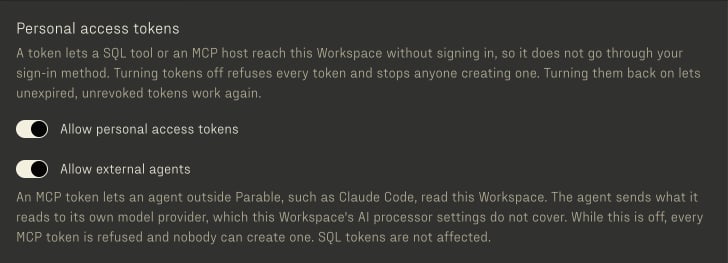
2
Add the server and sign in
<MCP host> is the host that
Connect an MCP host
names. The Workspace slug is the first
part of the Workspace’s address: acme in acme.parable.work. In Claude Code, /mcp shows the server
as needing authentication; choose it and Authenticate. The browser
opens the Workspace app, which asks you to sign in when you are not and
then shows the consent page: where the code goes, the name the client gives itself, and the
Workspaces you may grant. Under Also allow, turn on Save queries for
everyone in this Workspace only if the agent should save queries for
your Workspace (parables:write); it is off by default. Allow, and Claude Code
holds a token for that Workspace and refreshes it on its own.3
Ask a question
/mcp lists the server and its tools. Ask a question about your data;
Claude searches for the table, describes it, and runs a query.
/mcp__parable__pool_search shows the guidance it follows.claude mcp logout parable, which revokes
the grant, and remove the server with claude mcp remove parable. For up
to 5 seconds after the revocation the server can still admit the grant’s
access token and list tools. A tool call is refused.
A grant lives at most 90 days from the moment you allow it. That is the
default of OAUTH_GRANT_MAX_LIFETIME_DAYS on the Workspace API. After that, a
refresh answers invalid_grant, Claude Code discards its tokens, and the
next sign-in shows the consent page again. No access token lives past the
end of its grant. A grant that the host does not refresh for 30 days ends
sooner.
Protection → Agent Sign-ins in the Workspace app lists each grant that
still stands: the client, the host its code went to, the scopes, the
Workspace, when you allowed it, when the host last received tokens, and when
it ends.
- You see your own grants in every Workspace and revoke any of them.
- A Workspace administrator (
tenant.user.manage) also sees every member’s grant to the Workspace and revokes any of them.
Connect with an MCP token
A host that cannot sign in, or an automation that runs without a browser, uses a personal access token created for MCP instead.1
Create an MCP token
On the same page, choose Create token, choose MCP, name it for
where you will use it, and copy the value. It is shown once. The token
works in this Workspace only and reads with your roles. Turn on Save
queries for everyone in this Workspace only if the agent should save
queries for your Workspace (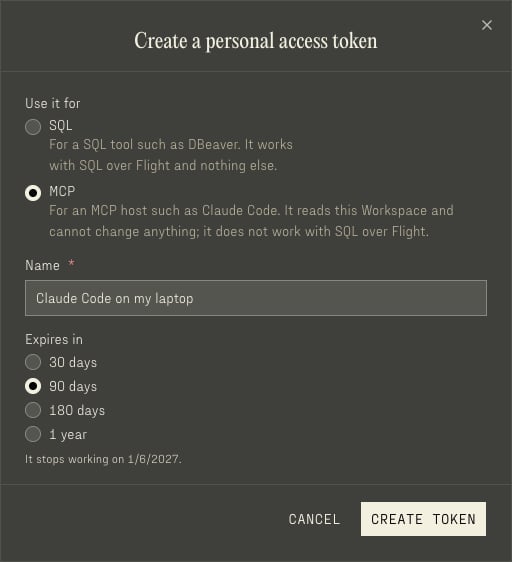
parables:write); it is off by default.2
Add the server with the token
<MCP host> is the host that
Connect an MCP host
names. The Workspace slug is the first
part of the Workspace’s address: acme in acme.parable.work. It must be
the Workspace you created the token in.parable for OAuth and parable-token for the token.
With one name, claude -p skips the token server while the OAuth one needs a
sign-in.
Remove the server with claude mcp remove parable when you are done: the
configuration holds the token. Revoke the token in Protection → Access
Tokens if it may have leaked. The server hands the token to the Workspace
API once, to learn whose it is, and never sends it again.
Any MCP host that speaks streamable HTTP connects one of the two ways: the
URL above and the OAuth sign-in its MCP library drives, or the URL and
Authorization: Bearer <MCP token>.
Local stdio
The local stdio server is the Staff MCP. It runs on the computer of a Parable staff member, and Parable does not host it. It keeps authentication and Workspace selection inside the MCP session, then sends each tool call to the Workspace API or the Admin API. Itsinitialize result carries
instructions: the session tools, and the loop of tool_search,
tool_schema and tool_call that
Discover tools describes.
Sign in
The host gives the server no credential: no header, flag or environment variable carries one. Sign in inside the session instead:- Call
auth_send_magic_linkwith your email. - Call
auth_consume_auth_tokenwith thetokenvalue of the link in the email. The server exchanges it for a session and keeps the session.
auth_consume_auth_token takes only that token value. The value is a UUID,
and the link writes it in a short form of up to 22 letters and digits. Before
it sends a request, the server checks the value against the UUID type that the
operation declares. It refuses any other value, so that value never reaches
the Workspace API. An MCP token and an OAuth access token are refused in this
way. The refusal names the Customer MCP,
https://mcp.parable.work/mcp/workspaces/<workspace-slug>, where those
credentials work.
Who can sign in
The Staff MCP is for Parable staff. Parable distributes it only through its private repository. The server does not check for a staff role:- Any person who can sign in by email link gets a session. The session has the permissions of that person.
- The Admin tools need staff permissions. The Admin API checks these permissions on each call.
- The Allow external agents setting of a Workspace does not apply to a stdio session. That setting applies only to the credentials of the Customer MCP: an MCP token and an OAuth sign-in.
Start in one Workspace
The--workspace <slug> flag makes each session start in that Workspace, as
if tenant_set had selected it. Without the flag, the server reads the
PARABLE_MCP_WORKSPACE environment variable. One host entry then serves one
Workspace, as the hosted URL does. tenant_set still changes the Workspace,
and env_switch clears it. The streamable HTTP server refuses the flag,
because its URL names the Workspace.
A Cursor entry for the local server, in ~/.cursor/mcp.json:
mcp.json
--config an absolute path, because the host chooses the folder that
the server starts in. In the session, sign in with
auth_send_magic_link and auth_consume_auth_token. Then use tool_call.
The documentation MCP is a separate, hosted interface for reading
these docs.